Skip to content

Experience records and live rankings, from wristband tap to results

ZZZARIT plans wristband check-in, activity records for running and score-based games, and results by email or kiosk. We coordinate with game rental providers and confirm build scope after equipment testing.

Discuss a custom build

When you need this

For events that want to collect lane-running times and score-game results by participant, then provide activity rankings and total scores. You do not need every hardware specification; share the rental provider's contact for technical coordination.

Build planning example

The concept links each attendee to activity records through a wristband, then presents rankings and results. These flows are planning examples; final scope and integrations are set after equipment testing.

Lane-based running time

A running activity example where each participant starts and finishes in an assigned lane.
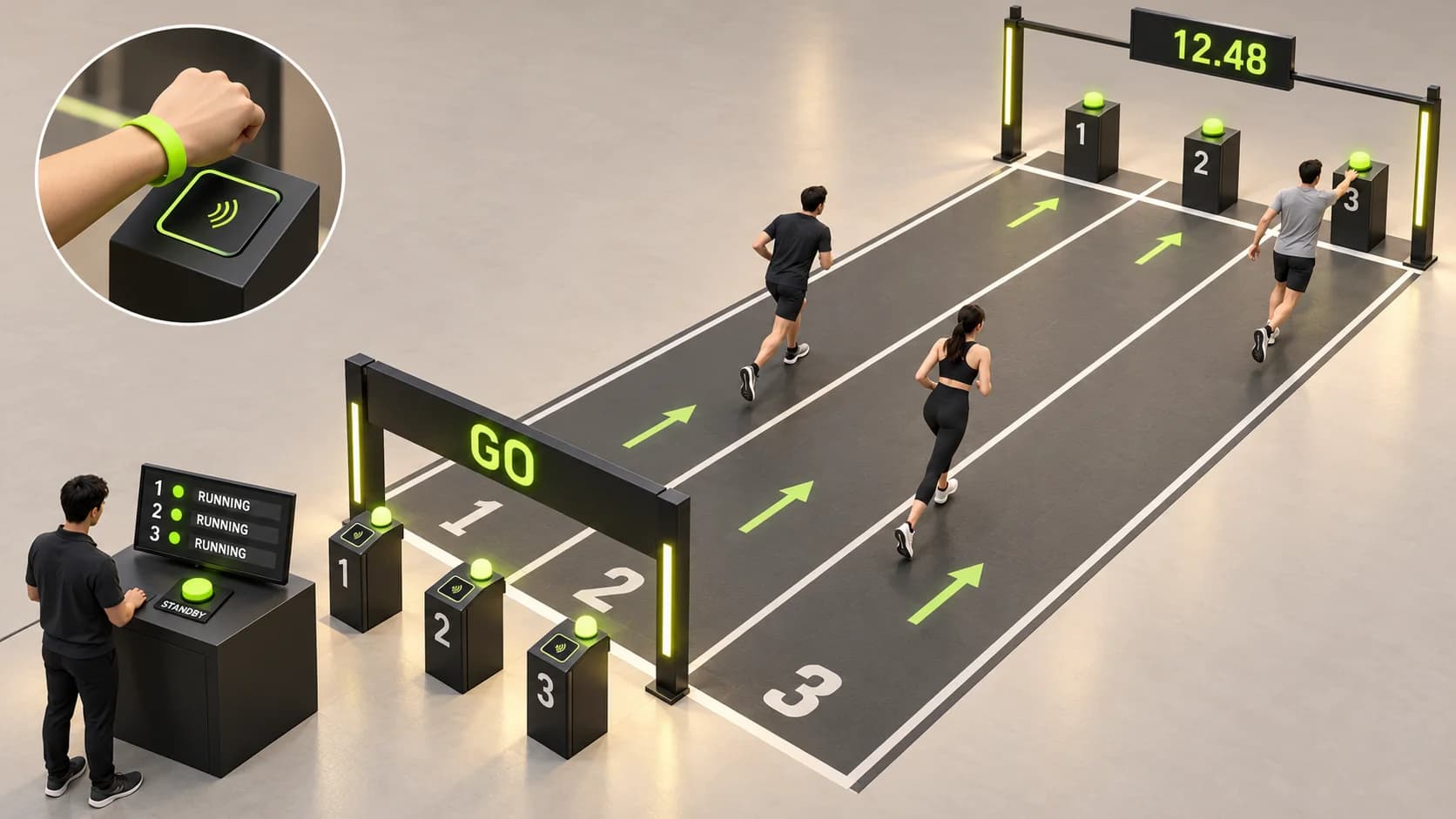
Planning illustration of a wristband reader, start lights, staff monitor and lane-specific finish buzzers for a running activity
AI-generated planning illustration. Equipment appearance and integration scope are confirmed after consultation and testing.
  1. Register at the start

    When a participant taps a wristband at the start, the assigned lane light turns on and the start staff monitor shows the lane and participant.

  2. Confirm readiness

    After staff confirm the participant and lane, they press Standby to begin a 3-2-1 countdown.

  3. Measure the run

    The lane timer starts at the start signal, so countdown time is excluded from the recorded result. The same signal also lights the finish buzzer for that lane.

  4. Save the finish

    When the participant reaches the finish and presses the lit buzzer for their own lane, the lane time is saved for the activity ranking.
Score-based game records

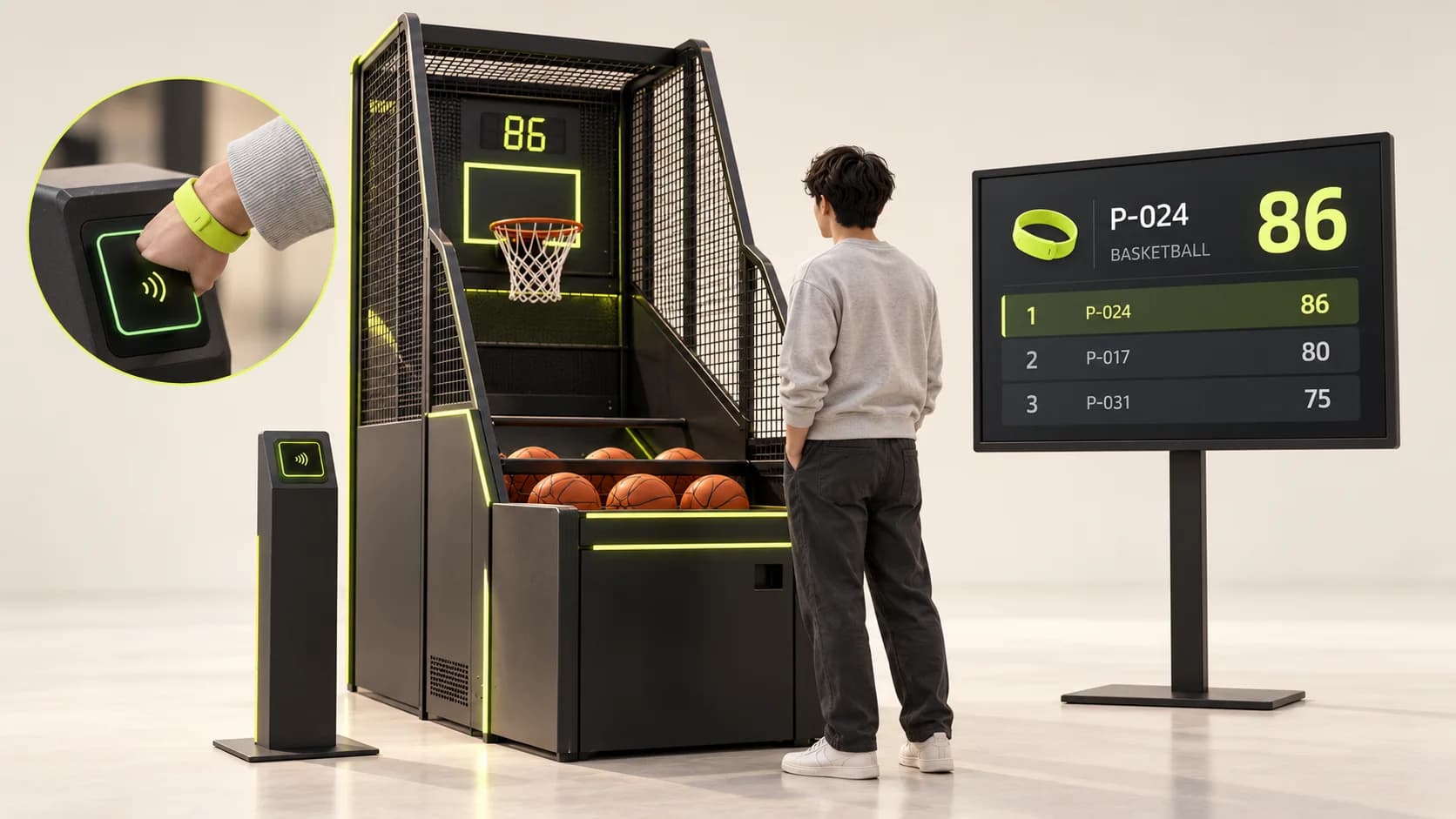
An integration planning example connecting game start and final score to a participant and activity.

Planning illustration connecting a wristband tap and a basketball game's final score to activity rankings
AI-generated planning illustration. Equipment appearance and integration scope are confirmed after consultation and testing.
  1. Link the participant

    Confirm the current game and participant, then tap the wristband at the start to link the game to that participant.

  2. Plan game-start control

    The concept uses a wristband tap to start the game. Whether the device can accept a start signal must be checked with the game equipment and its interface.

  3. Match the final score

    After the game ends, collect its final score and match it to the participant, game and activity linked to the wristband, then organize results by activity.

Total scores and result delivery

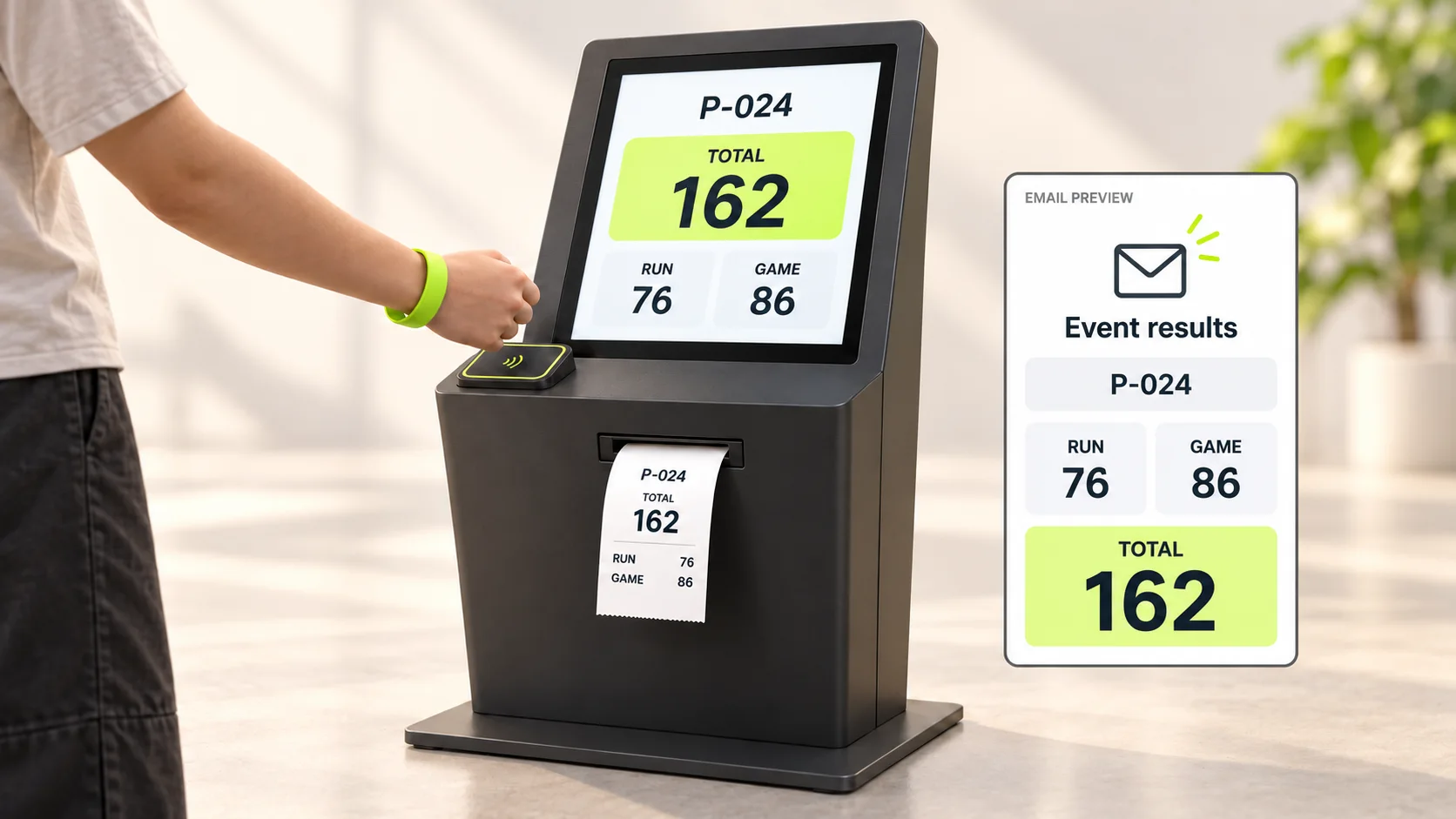
A planning example for organizing activity records and presenting results by email and at an on-site kiosk.

Planning illustration of a wristband-operated kiosk printing total scores alongside an email result preview
AI-generated planning illustration. Equipment appearance and integration scope are confirmed after consultation and testing.
  1. Calculate total score

    Apply agreed activity conversion and aggregation rules to calculate each participant's total and activity records.

  2. Email results

    Review sending results to the registered email address. Confirm address checks, delivery notice, duplicate-send prevention and personal-data retention in advance.

  3. Look up and print at a kiosk

    Plan a kiosk flow where a wristband tap retrieves the participant's results and prints total and activity scores. Confirm printer compatibility and print format through testing.

These are build planning examples. Lane lights, buzzers, timers, game-start signals, final-score transfer, email delivery, and kiosk or printer compatibility will be tested against actual equipment and venue conditions before scope and schedule are confirmed.

Share the rental provider's contact; ZZZARIT handles the technical discussion

Your agency does not need to know every reader, buzzer or game-device specification. If you plan to rent game equipment, share the rental provider's contact details. ZZZARIT handles technical discussions on game-start control and final-score transfer with the provider, then defines what needs testing. If a provider has not been selected yet, we can start with the activities you have in mind.

Discuss the plan and equipment

Planned operating flows

Lane-based running start and finish

Use a wristband tap to identify a lane and participant, then staff Standby and a 3-2-1 countdown. Timing starts at the start signal; pressing the participant's lane buzzer saves the finish record.

Score games and activity rankings

Link the participant by wristband when a game starts, then match the final score to the participant, game and activity record for activity rankings.

Total-score email and kiosk results

Calculate total scores using agreed rules, then email results or retrieve and print them at a kiosk after a wristband tap. Test email and retention rules and printer compatibility.

Agree on what to build and what to prepare

What we can configure

Lane-based running records
Plan wristband check-in, lane lights, staff confirmation, Standby and a 3-2-1 countdown, timing from the start signal, and a finish buzzer for each lane.
Participant-linked game scores
Plan to link a participant and current game by wristband at start, then match the final score to that participant's activity record after the game.
Activity rankings and results
Review activity rankings and total scores using agreed scoring rules, with results by email or wristband lookup and printing at a kiosk.
Technical coordination with rental providers
You do not need to know every equipment specification. Share the planned rental provider's contact and ZZZARIT will discuss game-start control and score transfer, then define testing needs.
How delivery works
  1. Map event and activity flows

    Define registration, running lanes and game rules, record and total-score calculations, and result delivery.

  2. Coordinate with rental providers

    ZZZARIT discusses required connections such as game-start signals and score data with the rental provider. You do not need to prepare every hardware specification.

  3. Test actual equipment

    Validate wristband taps, lane lights, buzzers and timers, game start and score transfer, email delivery, and kiosk printing against equipment and venue conditions.

  4. Confirm build scope and schedule

    Propose implementation, support and pricing based on test results and agreed operating rules.

Validation status

Confirm equipment compatibility and the agreed delivery scope before commissioning.

No validated hardware demo or public delivery case is available yet. We review game machines, readers and venue connectivity, then agree on rehearsal validation before confirming feasibility and delivery scope.

Before you decide

How does the running timing flow work?

A start-point wristband tap lights the lane and shows the participant on the staff monitor. Staff confirm and press Standby for a 3-2-1 countdown; the timer starts at the start signal. Pressing the lane's finish buzzer saves the record. This is a planning example.

Can we consult without knowing the game equipment specifications?

Yes. Share the rental provider's contact and ZZZARIT will discuss technical requirements such as game-start control and final-score transfer. Final integration scope and timing follow testing.

How are total scores delivered?

The concept applies agreed activity conversion and aggregation rules to activity records and total scores. We discuss email verification, delivery notices, duplicate-send prevention and retention; kiosk lookup and printing are scoped after printer testing.

Are the listed functions already validated?

No. Wristband links, lane lights, buzzers and timers, game-start signals and score transfer, email and kiosk printing are planning examples. Scope is confirmed after testing actual equipment.

How do score-based games start and match results?

The concept uses a wristband tap to link the participant and current game, then start play. The final score is matched to the same participant, game and activity. Tap-to-start control and score collection require coordination with the rental provider and testing on actual equipment.

Make this work for your event

Plan a flow that identifies participants by wristband, links running and score-based game records by activity, and presents rankings and results. Confirm build scope after equipment testing.

  • Dates, venue, peak arrivals, running lanes and concurrent games
  • Planned activities and rental supplier contact details; technical specifications are not required to start
  • Wristbands, readers, start lights, finish buzzers and displays
  • Retry, tie-break, activity conversion and overall-score rules
  • Result emails, kiosk printing and data retention and handoff
  • Supplier coordination, equipment testing, venue rehearsal and support

Experience Records & Live Rankings

Discuss a custom build

Confirm your configuration. The quote amount is sent by email.

Running this for a client? White-label & pitch support