
Anyone who has asked an AI for a proposal deck knows the feeling. Text overlaps, alignment drifts, and the design lands somewhere between plain and awkward. The AI is not incapable — you asked in a foreign language. This piece is a record of the one change in order that completely changes the result when you build proposals and decks with AI.
The familiar disappointment
The proposal deadline is closing in. You ask the AI.
“Turn this into a ten-slide deck.”
The result arrives. The content reads fine, but the screen is a mess. The title covers the body text, a shape hangs off the edge of the slide, bullet spacing is inconsistent. You fix it slide by slide until you think, "I should have just made it myself."
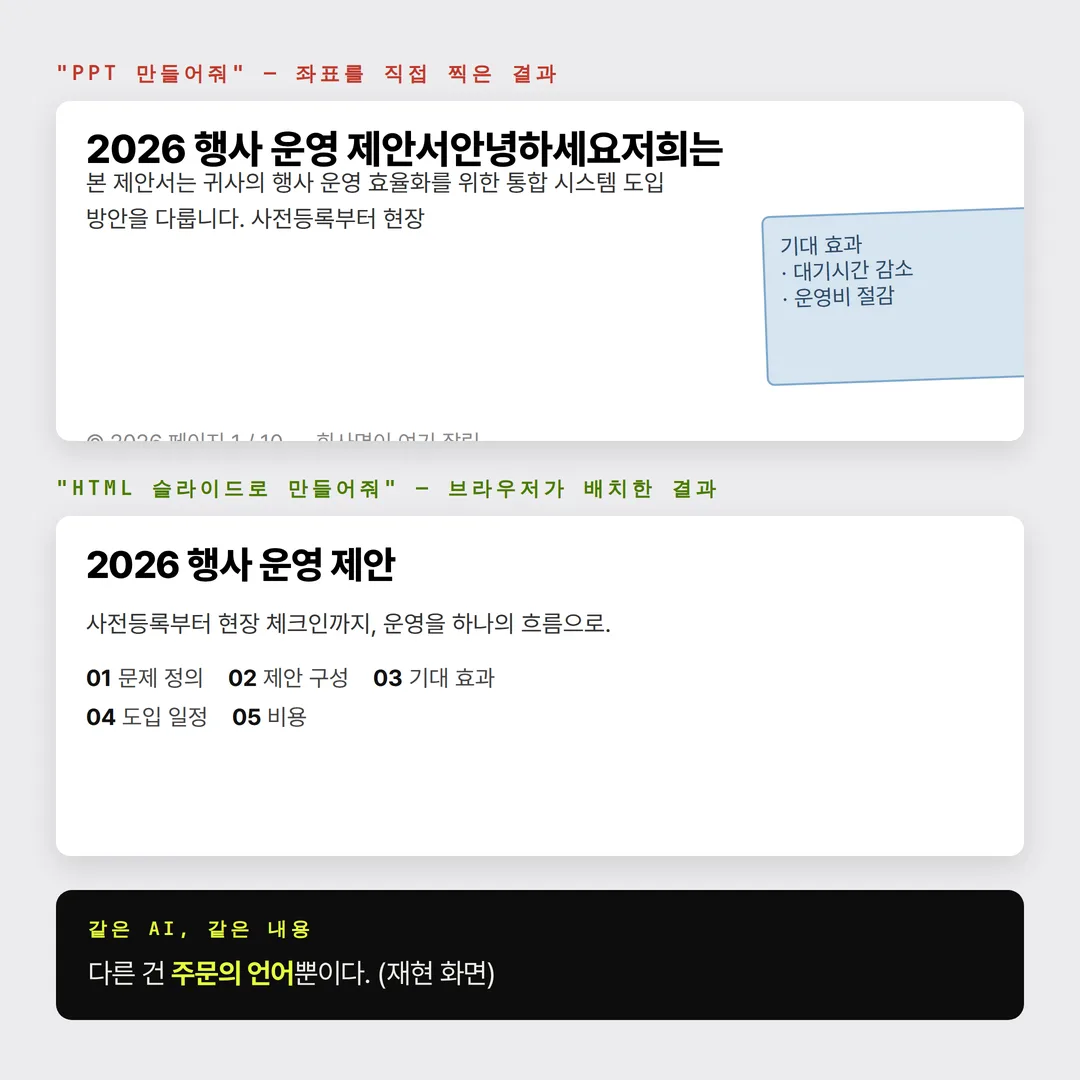
The conclusion most people draw here is "AI still can't do design." That conclusion is wrong.
A slide file is a foreign language to an AI
AI models learned from billions of web documents, and web documents are written in HTML. Expressing a heading, body copy, a list, or a table in HTML is the AI speaking its native language.
The volume of training on the internal structure of slide files is nowhere close. So when you ask for a deck, the AI stops working with the part of itself that writes and starts working with the part that places coordinates: "put this text box at x 340, y 210."
The catch is that the AI never sees the rendered result of the coordinates it just chose. It is arranging furniture with its eyes closed. Overlaps, overflow, and drift are the predictable consequence.
HTML comes with a layout engine
In HTML, the situation inverts. The AI does not place coordinates. It declares rules: heading large, body beneath it, this much margin, wrap when it overflows. Then the browser's layout engine computes the placement — a calculator validated by decades of rendering the world's web pages.
So the same AI splits two ways.
- Ask for a slide file — the AI computes the layout itself, without ever seeing the rendered result.
- Ask for HTML — the AI writes only content and rules, and the browser computes the layout.
The quality gap is structural, not a matter of effort.
The order is everything
So the order we recommend is this.
- 1Draft in HTML slides. "Build HTML slides from this content. 16:9, one slide per screen, arrow keys to advance." One sentence gets you a draft you can page through in the browser.
- 2Lock content and structure at this stage. "Swap slides 3 and 4," "add more evidence to slide 5," "tighten the overall tone." Edits here are edits to sentences, so they land in thirty seconds. Ten rounds of revision will not break the layout.
- 3Convert once, at the very end. With content, order, and emphasis settled, move it into a slide file or Figma slides. Conversion happens once, and the AI only has to carry over a structure that is already fixed.
Start in the slide file instead, and every edit request triggers a recalculation of coordinates. That is why "change one sentence" pushes the shape next to it out of place.
The honest caveat
Converting HTML to a slide file is not perfect either. Fonts shift, spacing moves slightly, and the final polish is still human work.
What changes is the volume of that polish. Start in the slide file and you rework all ten slides; lock it in HTML first and you touch only the few places that drifted. This method does not remove human work — it moves human time from coordinate labor to content.
Three prompts you can use right now
The draft request.
“Build HTML slides from the content below. 16:9, one slide per screen, arrow keys to advance. Keep the design clean: white background, black text, a single accent color.”
The revision stage.
“Reorder the slides as [problem → cause → proposal → cost → schedule], and rewrite the first line of each slide as its conclusion.”
The conversion stage.
“Convert this exact structure into a slide file. 16:9 slide size, with titles and body copy as editable text boxes.”
In closing
If the deck your AI produced looked amateurish, the problem was probably the language of the request rather than the ability of the model.
People reach for slide files because slide files are comfortable for people. The AI is comfortable somewhere else. Ask in the AI's native language instead of the delivery format: lock the content in HTML, convert once at the end. It is the same perspective we use when we build event websites that AI search can read — get the structure machines read right first, not the shape humans look at.
FAQ
Why does AI-generated slide output have overlapping text and broken alignment?
Slide files require explicit coordinates for every element, so the AI computes the layout itself — and it never sees the rendered result of the coordinates it chose. It is arranging furniture with its eyes closed, which produces overlaps and overflow.
What changes when you ask for HTML instead?
The AI writes rules rather than coordinates, and the browser's layout engine computes the actual placement. With a decades-validated engine handling layout, overlap and overflow largely disappear.
If the deliverable is a slide file anyway, why go through HTML?
Because edits are cheap in HTML. Revise while the content is still moving, then convert once everything is settled. Starting in the slide file makes every edit trigger a coordinate recalculation.
Does converting HTML to a slide file carry everything over?
Not perfectly. Fonts and spacing can shift, and the final polish stays human work. The difference is that you touch a few drifted spots instead of reworking all ten slides.
Which AI tools does this work with?
It is not tied to a specific service. The same order works with most models capable of writing HTML.
Does the same order apply to event proposals?
Yes. Lock the structure — problem, proposal, expected outcome, schedule, cost — in HTML, then convert at the end. Even when review reshuffles the order several times, the layout holds.